
LLMs have enabled us to process large amounts of text data very efficiently, reliably, and quickly. One of the most popular use cases that has emerged over the past two years is Retrieval-Augmented Generation, or RAG for short.
RAG allows us to take a number of documents (from a couple to even a hundred thousand), create a knowledge database from those documents, and then query that database to receive answers with relevant sources based on the original material.
Instead of manually searching, which would take hours or even days, we can get an LLM to search for us with just a few seconds of latency.
Cloud-based versus local deployment
There are two parts to making a RAG system work: the knowledge database and the LLM. Think of the former as a library and the latter as a very efficient library clerk.
The first design decision when creating such a system is whether you will host it in the cloud or locally. Local deployments have a cost advantage at scale and also help safeguard your privacy. On the other hand, the cloud can offer low startup costs and little to no maintenance.
For the sake of clearly demonstrating the concepts around RAG, we will opt for a cloud deployment during this guide. However, we will also leave notes on going local at the end.
The knowledge (vector) database
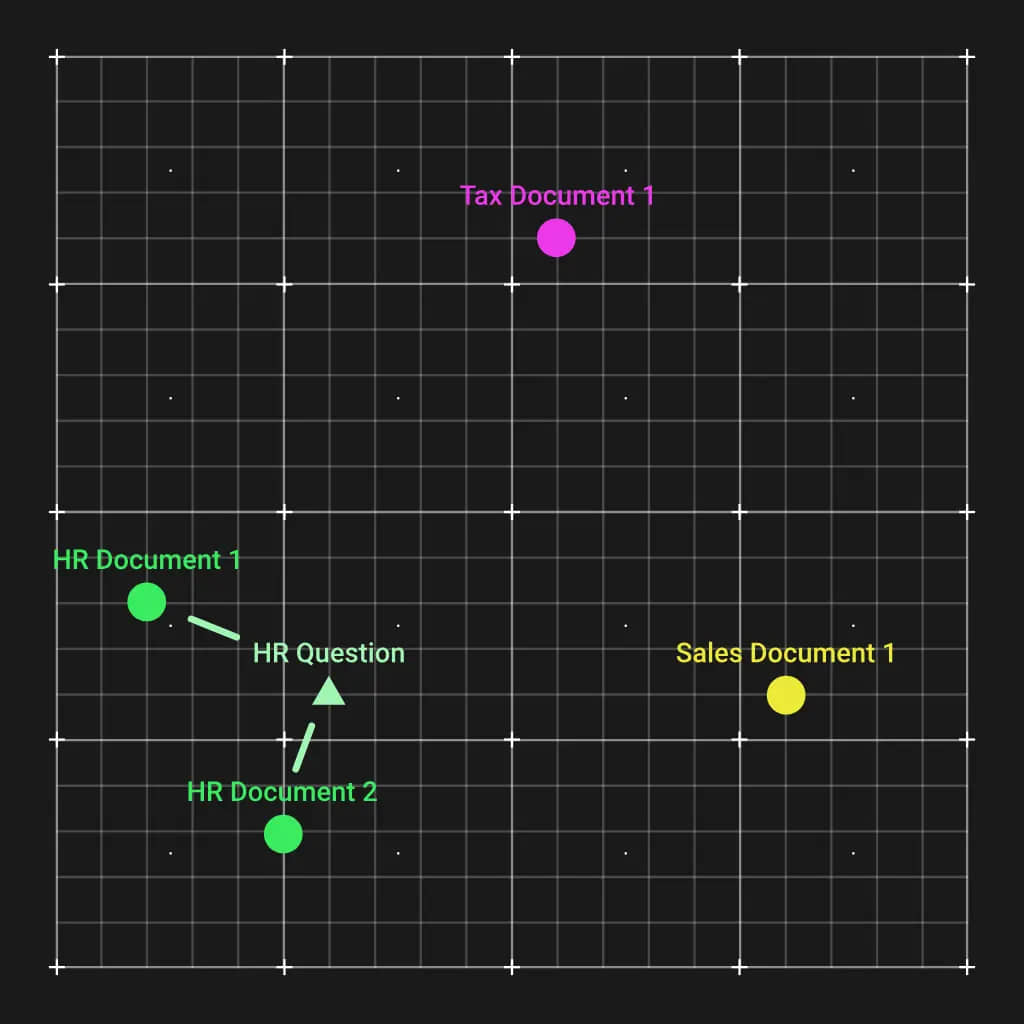
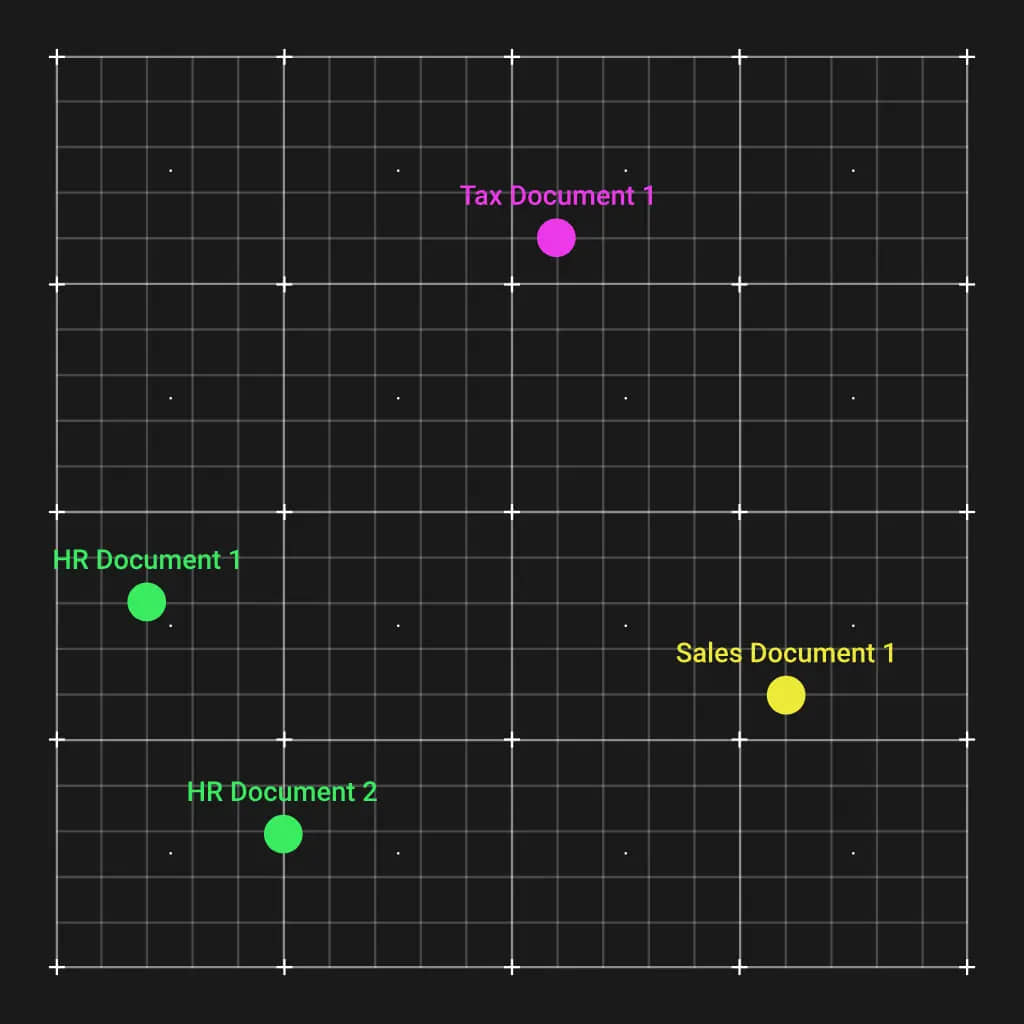
The first thing we need to do is create a knowledge database, technically called a vector database. This is done by running the documents through an embedding model that will create a vector out of each one. Embedding models are very good at understanding text, and the vectors generated will have similar documents positioned closer together in the vector space.
This is incredibly convenient. When we get a question regarding a specific topic, such as human resources, we can calculate an embedding vector for that question. That vector will end up close to the relevant HR documents. Using a simple Euclidean distance calculation, we can match the most relevant documents to give to the LLM so it can answer the question.
Choosing an embedding model
There is a vast array of embedding algorithms to choose from, all compared on the MTEB leaderboard. An interesting fact is that many open-source models are taking the lead compared to proprietary providers like OpenAI.
Besides the overall score, two more columns to consider on that leaderboard are the model size and the maximum token limit of each model.
The model size will determine how much video RAM (VRAM) is needed to load the model in memory, as well as how fast embedding computations will be.
Each model can only embed a certain number of tokens, so very large files may need to be split before embedding.
Lastly, embedding models can only process text. Any PDFs will need to be converted, and rich elements like images should be either captioned (using an AI image caption model) or discarded.
The open-source local embedding models can be run locally using Transformers. For the OpenAI embedding model, you will need an OpenAI API key instead.
Python code example: Creating embeddings
Here is Python code to create embeddings using the OpenAI API and a simple pickle file-system-based vector database:
import os
from openai import OpenAI
import pickle

openai = OpenAI(
    api_key="your_openai_api_key"
)

directory = "doc1"
embeddings_store = {}

def embed_text(text):
    """Embed text using OpenAI embeddings."""
    response = openai.embeddings.create(
        input=text,
        model="text-embedding-3-large"
    )
    return response.data[0].embedding

def process_and_store_files(directory):
    """Process .txt files, embed them, and store in-memory."""
    for filename in os.listdir(directory):
        if filename.endswith(".txt"):
            file_path = os.path.join(directory, filename)
            with open(file_path, 'r', encoding='utf-8') as file:
                content = file.read()
                embedding = embed_text(content)
                embeddings_store[filename] = embedding
                print(f"Stored embedding for {filename}")

def save_embeddings_to_file(file_path):
    """Save the embeddings dictionary to a file."""
    with open(file_path, 'wb') as f:
        pickle.dump(embeddings_store, f)
        print(f"Embeddings saved to {file_path}")

def load_embeddings_from_file(file_path):
    """Load embeddings dictionary from a file."""
    with open(file_path, 'rb') as f:
        embeddings_store = pickle.load(f)
        print(f"Embeddings loaded from {file_path}")
        return embeddings_store

process_and_store_files(directory)
save_embeddings_to_file("embeddings_store.pkl")
Working with the LLM
Now that we have the documents stored in the database, let us create a function to retrieve the top three most relevant documents based on a query:
import numpy as np

def get_top_k_relevant(query, embeddings_store, top_k=3):
    """
    Given a query string and a dictionary of document embeddings,
    return the top_k documents most relevant (lowest Euclidean distance).
    """
    query_embedding = embed_text(query)

    distances = []
    for doc_id, doc_embedding in embeddings_store.items():
        dist = np.linalg.norm(np.array(query_embedding) - np.array(doc_embedding))
        distances.append((doc_id, dist))

    distances.sort(key=lambda x: x[1])
    return distances[:top_k]
Now that we have the relevant documents, the next step is straightforward. We prompt our LLM (GPT-4o in this case) to provide an answer based on the retrieved context:
from openai import OpenAI

openai = OpenAI(
    api_key="your_openai_api_key"
)

def answer_query_with_context(query, doc_store, embeddings_store, top_k=3):
    """
    Given a query, find the top_k most relevant documents and prompt GPT-4o
    to answer the query using those documents as context.
    """
    best_matches = get_top_k_relevant(query, embeddings_store, top_k)

    context = ""
    for doc_id, distance in best_matches:
        doc_content = doc_store.get(doc_id, "")
        context += f"--- Document: {doc_id} (Distance: {distance:.4f}) ---\n{doc_content}\n\n"

    completion = openai.chat.completions.create(
        model="gpt-4o",
        messages=[
            {
                "role": "system",
                "content": (
                    "You are a helpful assistant. Use the provided context to answer the user's query. "
                    "If the answer isn't in the provided context, say you don't have enough information."
                )
            },
            {
                "role": "user",
                "content": (
                    f"Context:\n{context}\n"
                    f"Question:\n{query}\n\n"
                    "Please provide a concise, accurate answer based on the above documents."
                )
            }
        ],
        temperature=0.7
    )

    answer = completion.choices[0].message.content
    return answer
Conclusion
There you have it. This is an intuitive implementation of RAG with significant room for improvement. As you build more sophisticated systems, consider integrating proper cybersecurity measures, automations, and reliable web hosting for any website design and development projects involving RAG systems.
For ongoing performance, regular website maintenance and even WordPress custom plugins (if you are working within WordPress) can extend your RAG implementation. Strong SEO practices will also help surface your RAG-powered content effectively.